What Is HTTPS? A Plain-English Guide to the Little Padlock in Your Browser
Look up at the top of your browser right now. See that little padlock next to the website address? That padlock is HTTPS doing its job.
Most people have seen it a thousand times and never stopped to ask what it actually is. Which is fair — the internet is full of icons we never think about. But HTTPS is one of those things that quietly protects you every single day, and once you understand it, you'll start to notice it everywhere. You'll also stop being fooled by a couple of myths around it that even tech-savvy people get wrong.
So let me explain HTTPS the way I'd explain it to my mum. No jargon walls, no copy-pasted Wikipedia paragraphs. Just the honest version.
The short version
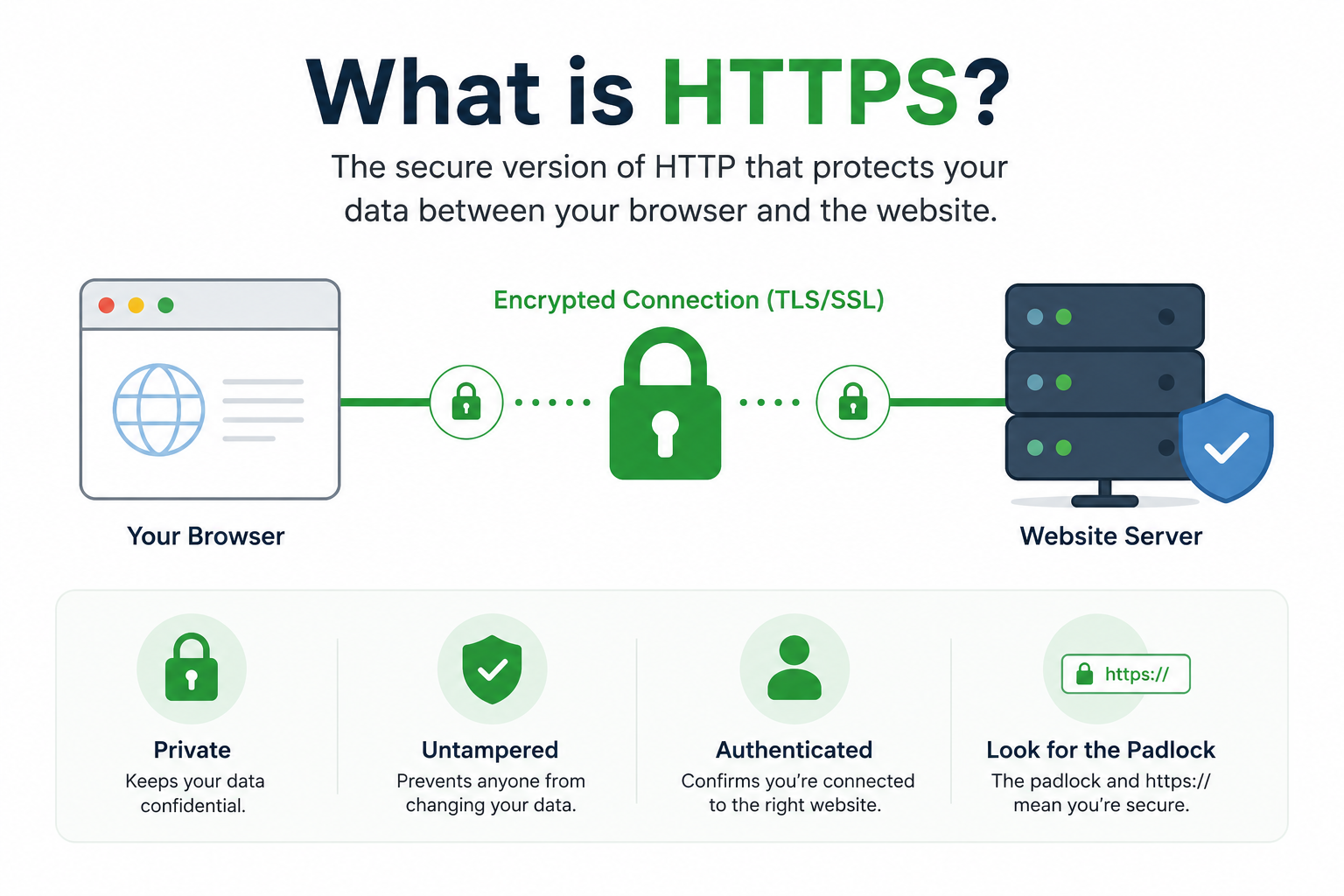
HTTPS stands for HyperText Transfer Protocol Secure. That's the technical name. In plain English, it's just the secure version of the way your browser talks to a website.
When you visit a site, your browser and that site's server have to exchange messages — "give me the homepage", "here's the homepage", "here's the form I filled in", "here's your order confirmation". HTTPS is what makes sure those messages are:
- Private — nobody else on the network can read them.
- Untampered — nobody can secretly change them while they're in flight.
- Going to the right place — the server you think you're talking to is actually the one you're talking to.
That's it. Those three things. Privacy, integrity, identity.
Without HTTPS (so just plain old HTTP), everything you send and receive is basically a postcard. Anyone with the right tools sitting between you and the website — your ISP, the café Wi-Fi router, a hacker on the same network — can read it, copy it, or change it. With HTTPS, it's a sealed envelope with a tamper-evident seal and the receiver's verified signature on it.
How HTTPS actually works (without the math)
People love to say HTTPS "uses encryption" and leave it there. That's true, but it skips the interesting part. Here's roughly what happens in the first second after you click a link.
- Your browser opens a connection to the website's server.
- The server says "hi, here's my SSL certificate" — a small file signed by a trusted third party (called a Certificate Authority, or CA) that basically vouches: yes, this server is really example.com.
- Your browser checks that certificate. Is it expired? Is it really signed by a CA my computer trusts? Does the name on it match the site I asked for?
- If everything checks out, your browser and the server do a quick mathematical handshake to agree on a one-time secret key — only the two of them know it.
- From that moment on, every message between you and the site is scrambled using that secret key. Anyone listening in just sees gibberish.
This handshake is the part people call "SSL" or "TLS". TLS (Transport Layer Security) is the modern name; SSL is the older name everyone still says out of habit. When you hear "SSL certificate", "TLS handshake", "HTTPS connection" — they're all part of the same family.
The important thing is this: the security isn't magic. It depends on three things working correctly: the certificate being valid, the certificate authority being trustworthy, and the math behind the encryption being strong. When any of those breaks, HTTPS breaks too — which is why browsers throw those big red warning pages when something looks off.
HTTP vs HTTPS — what's actually different
Same protocol, one critical addition. HTTP is the original way browsers and servers talk. HTTPS is HTTP wrapped inside that encrypted TLS tunnel we just described.
In practice, here's what changes from your point of view:
- The URL starts with https:// instead of http://.
- The browser shows a padlock, or some kind of "Secure" indicator.
- The browser does not show big red "Not Secure" warnings when you fill in a form.
Behind the scenes, basically everything is the same — same HTML, same images, same JavaScript. HTTPS just adds a privacy and identity layer on top.
Modern browsers have gotten aggressive about this. Chrome, Firefox, Safari, Edge — they all now actively warn you when a site is plain HTTP, especially if there's a password or payment form on it. Some pages will just refuse to load at all. That's intentional. The web has been steadily moving to "HTTPS by default" for years now, and as of 2026, a plain-HTTP commercial website is basically a relic.
What HTTPS actually protects you from
Let's be specific, because this is where people get confused. HTTPS protects you from:
- Eavesdropping on public Wi-Fi. Coffee shop, airport, hotel — if someone is sniffing the network, they can't read your HTTPS traffic. They can see that you visited a site, but not what you did on it.
- Man-in-the-middle attacks. Someone can't sit between you and your bank, intercept your password, and forward a modified request. The certificate check stops them.
- Tampering by your network. Your ISP can't quietly inject ads or tracking scripts into the pages you load over HTTPS. They can with plain HTTP, and historically some have.
- Credential theft over the wire. Your password, your credit card, the contents of your messages — all encrypted in transit.
These are real, daily protections. They are the reason every login form, every checkout, every banking session uses HTTPS now.
What HTTPS does NOT protect you from (this is the important part)
This is where I have to be a little blunt, because this misunderstanding is genuinely costing people money.
HTTPS does not mean a website is safe. It does not mean a website is legitimate. It does not mean a website is honest.
All HTTPS proves is that:
- The connection between you and that website is encrypted.
- The website's certificate matches its domain name.
It says nothing about who runs the site, whether they'll ship your order, whether they'll steal your card details, whether the "Rolex" is real, or whether the "support agent" is actually a scammer in a call centre.
A scam site can have a perfectly valid HTTPS padlock. In fact, most modern scam sites do. SSL certificates are now free and easy to get — services like Let's Encrypt hand them out in seconds. A criminal can register a fake-looking domain, get a free certificate, and have a padlock in front of their phishing page within ten minutes.
So when someone tells you "the site is safe, it has the padlock" — they are repeating advice that was already outdated a decade ago.
The padlock means the conversation is private. It does not mean the conversation is with someone you should trust. Those are two very different things.
This is exactly why we built our free website checker — to look at the signals HTTPS doesn't cover: domain age, hosting, public threat intelligence, contact details, technical history. A padlock is a starting point, not a verdict.
What HTTPS means for shoppers
If you're shopping online, here's the practical version:
- If a site is plain HTTP and asks for a card or password, walk away. There's no good reason for that in 2026.
- If a site is HTTPS, that's the bare minimum, not a green light. It only means your data won't be intercepted in transit — it doesn't mean the seller is real.
- Don't fall for "we are SSL secured" badges in the footer. Those badges are just images. Anyone can paste one in.
- Pay attention to the domain name in the address bar, not the padlock. Scammers often use look-alike domains: amaz0n-deals.com, paypa1-secure.net. The padlock will still show. The domain is the lie.
Use HTTPS as a hygiene check, then check the actual trustworthiness of the business separately — reviews, age, contact info, returns policy, an independent check, whatever you can.
What HTTPS means for website owners
If you run a website, the situation in 2026 is simple: HTTPS is non-negotiable.
Here's why you have to be on HTTPS, even if you "don't take payments":
- Browsers shame plain HTTP. Visitors see "Not Secure" next to your name in their browser. That alone tanks trust and conversions.
- Google ranks HTTPS sites higher. SEO-wise, HTTP is a handicap.
- Modern browser features require it. Geolocation, service workers, push notifications, camera access — almost every modern web API is blocked on HTTP.
- It's free and automatic. Most hosts (Cloudflare, Vercel, Netlify, your average shared host) install Let's Encrypt certificates for free, often with one click or by default.
- Your visitors expect it. Plain HTTP now feels broken to most users.
There's basically no reason to be on HTTP anymore. If your site is, fix it this week. Force every HTTP request to redirect to HTTPS (a 301 redirect). Add HSTS so browsers remember to always use HTTPS for your domain. Make sure your certificate auto-renews — expired certificates are the #1 way "I had HTTPS" turns into "my site is broken and everyone sees a scary red page".
If you want to go a step further and tell visitors that your site isn't just encrypted but actually independently reviewed and accountable, that's what our verified badge is for. HTTPS is the lock on the door. A trust badge tells people who lives in the house.
Quick myth-busting
A few things I hear constantly that just aren't right:
- "HTTPS makes my site slow." Not anymore. TLS 1.3 is fast. The handshake adds milliseconds. You will not notice.
- "I don't need HTTPS, my site is just a blog." Yes you do. See: browser warnings, SEO, modern APIs, basic dignity.
- "The green padlock means the site is verified." No. It means the connection is encrypted. The site itself is not verified by anyone.
- "Extended Validation (EV) certificates still show the company name in green." They don't, not really. Browsers stopped highlighting EV certificates in the address bar years ago because users couldn't tell the difference anyway. Don't pay extra for them expecting a UI benefit.
- "HTTPS protects me from viruses." No. HTTPS protects the channel. A site can still serve malware over HTTPS perfectly happily.
A simple mental model
If it helps, think of HTTPS like sending a letter through the post:
- HTTP is writing your message on the outside of the envelope. Everyone who handles it can read it.
- HTTPS is sealing the message inside an envelope that only the recipient can open, and the recipient signs the envelope so you know it really came from them.
It says nothing about whether the person you're writing to is honest. It just makes sure that what you said gets to them, only to them, and exactly as you wrote it.
That's HTTPS. That's all it is. Useful, important, mandatory in 2026 — but only one piece of staying safe online.
FAQs
Is a website with HTTPS automatically safe?
No. HTTPS only means the connection is encrypted and the certificate matches the domain. It says nothing about who runs the site or whether they're honest. Scam sites can — and routinely do — have valid HTTPS. Always check other signals like domain age, reviews, contact details, and use an independent checker before trusting a site with money or personal information.
What does the padlock icon in my browser actually mean?
It means three things: the connection to the site is encrypted, the site presented a valid SSL/TLS certificate, and your browser trusts the authority that issued that certificate. It does not mean the website itself is verified, the business is real, or your data is safe once it arrives on their server.
What's the difference between SSL and TLS?
SSL is the original protocol from the 90s. TLS is its modern replacement. The actual SSL protocol has been deprecated for years — every secure connection today uses TLS. But the name "SSL certificate" stuck around because people are used to it, so the industry uses "SSL" and "TLS" almost interchangeably in casual conversation.
Can a fake or scam website have HTTPS?
Yes, easily. SSL certificates are free from services like Let's Encrypt and can be issued in seconds. A scammer can register a fake domain in the morning and have a working HTTPS padlock by lunch. The padlock is about the connection, not the trustworthiness of the people on the other end.
What does "Not Secure" in my browser mean?
It means the site is loading over plain HTTP, with no encryption. Anyone on the network between you and that site could read or modify the page. You should never enter passwords, payment details, or personal information on a "Not Secure" page.
Do I need HTTPS for a small personal website or blog?
Yes. Modern browsers display warnings on HTTP sites, search engines favour HTTPS, and most hosting providers give you a free certificate with one click. There's no real downside to enabling it, and several real downsides to leaving it off.
Why do some HTTPS pages still get marked as "Not Fully Secure"?
That usually means the page is HTTPS, but it's loading some images, scripts, or stylesheets over plain HTTP — called mixed content. The browser warns you because those insecure resources could be tampered with. The fix is for the website owner to make sure every asset loads over HTTPS.
Is HTTPS the same as a VPN?
No. HTTPS encrypts the connection between your browser and one specific website. A VPN encrypts all your internet traffic between your device and the VPN provider, regardless of the destination. They solve overlapping but different problems and are often used together.
How can I tell if a website is really who it says it is?
The padlock proves the certificate matches the domain — but it doesn't prove the domain belongs to the brand you think you're visiting. Always read the full domain name in the address bar carefully (watch for look-alike characters and extra words), and when in doubt, run the URL through an independent website checker before you act on anything.
Online safety is a habit, not a single icon. Always do your own research, especially before sending money or sharing personal information — the padlock is just one signal among many.