Quishing Uncovered: How Malicious QR Codes Steal Credentials and How to Spot Them
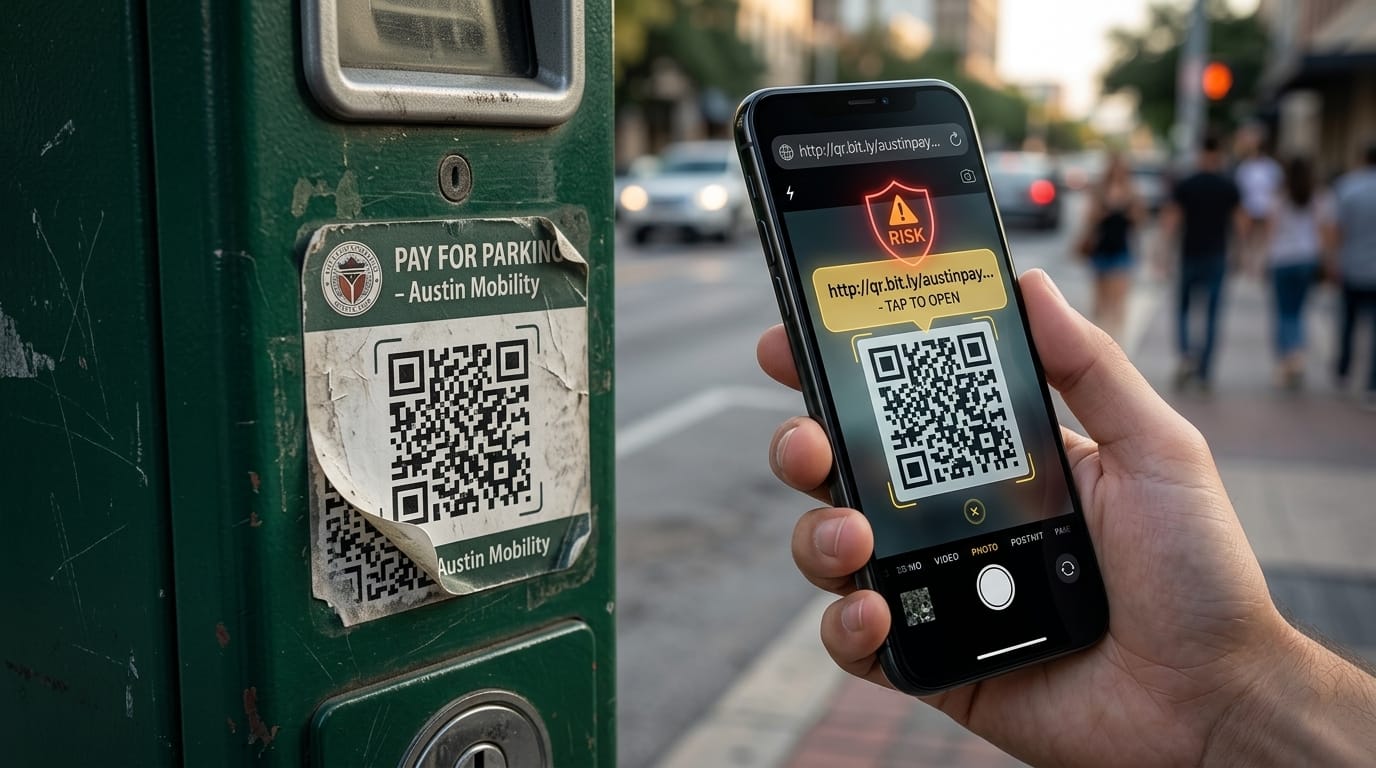
You pull into a parking spot in a busy part of town, step up to the payment kiosk, and see a neat little square telling you to scan and pay from your phone. You open your camera, tap the prompt, type in your card details, and walk away thinking you're set. Two days later, your bank alerts you to charges from an offshore storefront you’ve never touched, and you’ve got a parking ticket sitting under your windshield wiper anyway.
Welcome to quishing — phishing via QR codes.
Most people have built up a healthy reflex for spotting sketchy links in random text messages or strange emails. But because a QR code is just an abstract grid of black and white pixels printed on a physical sign, your brain doesn't register it as software code. This guide covers what quishing actually is, the tricks scammers use to get past security gates, the warning signs worth watching for, and what to do if you scanned a bad code.
What Quishing Actually Is
"Quishing" is short for QR code phishing. It is the exact same scheme cybercriminals have run for decades, except instead of sending a blue text link, they encode the malicious address into a Quick Response (QR) matrix.
A QR code is just an optical representation of text. When your phone's camera detects those geometric blocks, it reads the data and automatically offers to launch the decoded web address in your browser.
The core vulnerability isn't the technology itself; it's that humans cannot read QR codes with the naked eye. When an email contains a sketchy hyperlink like login-update-account.secure-verify-alert.com, your instincts immediately flag that something is wrong. When that same URL is compressed into an image of squares, it looks identical to a harmless restaurant menu or a municipal parking meter.
The Main Types of Quishing Attacks
| Attack Type | Where It Happens | What the Scammer Does |
|---|---|---|
| Physical Overlay | Parking meters, charging stations, restaurant tables | Pastes an adhesive vinyl sticker directly over the legitimate merchant code |
| Inbox Bypass | Corporate and personal email accounts | Sends security alerts as inline PNG images to slip past text-based spam filters |
| Cloaked Shortener | Public flyers, mailers, printed advertisements | Uses URL shorteners and intermediate gateways to hide the real destination domain |
| Session Hijacker | Login prompts on social or messaging apps | Clones QR login mechanics to bind your authenticated session to the attacker's browser |
| Malicious Profile Drop | Fake Wi-Fi sign-ins, public transport hubs | Prompts you to install an unauthorized iOS profile or an Android APK directly |
Just like regular scams, a quishing attempt rarely stops at a single step. An attacker might paste a printed sticker on an EV charger that bounces through a URL shortener, passes a quick bot verification to dodge web security crawlers, and dumps you onto an unindexed domain designed to scrape your debit card number.
How Quishing Attacks Actually Work
Scammers have shifted toward QR codes because they disrupt normal digital safety habits in ways traditional web links can't:
Dodging automated spam gateways. Most corporate email filters and spam protections work by crawling the HTML body of incoming messages, looking for malicious domains. If an email has no text links—just an embedded image of a QR code—many automated tools let it land straight in your inbox because it looks like a standard graphic.
Pushing you off protected computers. If you receive a scam email while working on a laptop, the message usually tells you to scan the code with your phone. The moment you do that, you leave behind desktop protection tools, ad blockers, and wide-screen URL visibility, moving to a small mobile screen where long URLs get cut off.
Exploiting physical environments. Anyone can generate a free QR code online in five seconds, print it onto an adhesive sticker, and walk down a busy sidewalk. Public meters, bus shelters, and outdoor dining tables are rarely guarded, making physical tampering fast and low-risk for the scammer.
Trading on blind convenience. People have spent years scanning codes for menus, plane tickets, and Wi-Fi networks. That muscle memory makes users assume that if a code is stuck to a physical wall or machine, the owner of the property put it there.
Warning Signs a QR Code Might Be Malicious
Some fake codes are visibly sloppy, while others are executed cleanly. Here is what to check before and after scanning:
- The QR code on a kiosk, meter, or table is a sticker layered over the original surface with raised edges or peeling corners
- The link preview shown by your camera uses an unfamiliar URL shortener (like tinyurl or bit.ly) instead of the venue's actual domain
- The landing page demands a password, email login, or account verification just to show you a static menu or public info
- The web address in your browser shows an obscure top-level domain (like
.top,.xyz, or.cc) instead of a normal.comor.org - Scanning prompts an immediate file download, like an
.apkfile or an iOS configuration profile - The checkout page forces you to type raw credit card details and doesn't offer Apple Pay, Google Pay, or standard payment options
- You receive an email warning that your account or password has expired, with no text link and only an embedded QR image to resolve it
One or two of these flags is a clear reason to stop. If you’ve already scanned a code and suspect a malicious background script or tracker was dropped onto your device, running an on-demand check gives you immediate clarity — Malwarebytes' free scanner identifies rogue downloads, mobile adware, and silent tracking scripts within minutes.
What to Do If You Scanned a Suspicious QR Code
If you scanned an unverified code and think you handed over personal details or triggered a silent download, follow this cleanup order:
1. Close the browser tab and cut your connection. Shut the tab immediately. If the page began downloading a file or asked to install an update, switch on Airplane Mode or disconnect from Wi-Fi to stop the script from communicating with the remote server.
2. Check your phone's downloads folder. Open your device's file manager and look at recent downloads. If you see any newly added .apk, .dmg, or installer packages you didn't deliberately request, delete them right away without opening them.
3. Inspect installed profiles (iPhone). On iOS, go to Settings → General → VPN & Device Management. If there is a profile listed that wasn't set up by your employer, school, or mobile carrier, delete it. Malicious profiles can silently route your data through a private proxy.
4. Clear browser cookies and history. Open your mobile browser settings and wipe your cached images, cookies, and browsing history. This clears persistent tracking tokens or session identifiers placed by the site.
5. Run a dedicated on-demand security scan. If an unauthorized script or background process managed to execute, your standard mobile interface won't alert you to it. Running an on-demand scan using Malwarebytes detects and quarantines hidden background payloads that general system utilities miss.
6. Change compromised passwords from a clean device. If you typed your login credentials into a form after scanning, assume that account is compromised. Log in from a separate device, change the master password, and choose "Log out of all other sessions."
7. Lock down payment cards. If you typed your card details into an unverified parking or checkout page, call your bank's fraud line immediately to block the card, request a replacement, and dispute any unauthorized pending charges.
Does Built-In Mobile Security Already Protect Me?
Modern smartphone operating systems do have solid baseline protections. Both iOS and Android keep apps sandboxed, and camera apps show you a small domain preview before you click through.
The issue is that native camera viewers are passive decoders. They display the first link they read, but they don't trace where that link will ultimately redirect after two or three intermediate hops. If the QR code routes through a clean shortener that bounces to a phishing page, your camera preview only sees the clean shortener.
Relying on camera previews alone leaves blind spots. While smartphones block most automated drive-by downloads, they can't prevent you from entering a password or card number into a convincing clone page. Pairing standard mobile defenses with dedicated threat software like Malwarebytes gives you real-time web protection that blocks known malicious domains and phishing gateways before the page even loads.
Safe Scanning Rules to Protect Yourself
You don't have to stop using QR codes, but adopting a few simple rules makes a major difference:
- Feel the surface before scanning in public. If an outdoor kiosk or charging station has a sticker layered over the plate, use the official app or a physical card reader instead.
- Never use third-party "QR Scanner" utility apps. The default camera app on your phone decodes codes natively. Third-party scanner apps from app stores often carry aggressive ads, collect tracking data, or push unnecessary paid subscriptions.
- Check the root domain name. Wait for your camera preview to generate the link, and read the actual domain before tapping. If it doesn't match the business you're dealing with, don't open it.
- Never enter login credentials on a QR-delivered page. If a code meant for a static menu or public PDF asks for your Google, Apple, or Microsoft account, exit immediately.
- Keep real-time protection enabled. Manual scans clean up after the fact, but real-time protection blocks rogue pages the moment you tap through. Malwarebytes Premium adds that active shield so suspicious destinations get stopped before they can load on your screen.
Frequently Asked Questions
Can scanning a QR code infect my phone without tapping anything?
On an updated smartphone, simply aiming your camera at a QR code will not infect your device. Your camera only decodes the pattern into text. A problem only starts when you tap the link preview, visit the page, and take an action — like submitting login details, approving an unknown profile, or running an unauthorized download.
Why do scammers use QR codes instead of regular web links?
QR codes hide the true web address from both everyday users and automated security systems. Text links are easy for spam filters to inspect and block, but reading URLs embedded inside image files is much harder. In public spaces, stickers give scammers a quick, low-cost way to reach hundreds of people without hosting visible malware directly.
Are QR codes on restaurant menus safe?
Most restaurant QR codes are harmless, but they are vulnerable to physical tampering. In busy dining rooms or outdoor patios, scammers can easily stick a counterfeit QR label over the real table marker. If a menu asks you to download an installer or enter personal account details to view food prices, notify the staff.
What should I do if a QR code prompts an automatic file download?
Cancel it or delete the file immediately from your downloads folder without opening it. On Android, verify that your browser settings have "Ask where to save files" enabled and ensure "Install unknown apps" remains toggled off.
Is a dynamic QR code more dangerous than a static one?
Dynamic QR codes carry more risk for the user. A static code permanently embeds the destination address so it can't be changed once printed. A dynamic code routes through an intermediate redirect server, meaning the creator can point it to a safe website during initial tests and swap in a malicious link later on.
How can I check if a decoded link is safe before opening it?
Before tapping the link preview, inspect the full domain name shown by your camera. If you want to check a suspicious link without loading it on your phone, copy the text into an online URL reputation scanner to see if the domain has been reported for malicious activity.
Final Thoughts
QR codes were created for industrial convenience, and that convenience makes them a prime target for manipulation. Most quishing attempts rely on simple, predictable tricks: fake stickers on payment terminals, urgent security warnings sent as images, and shortened links designed to slip past your attention.
If you suspect you scanned an unverified code or visited a compromised page, don't wait for unexpected account charges or login notices. Running a free scan with Malwarebytes takes only a couple of minutes, clears out background threats before they spread, and gives you clear confirmation that your device is clean.